 miniceo
WhatsApp AI agent for your business: what it is, how it works and where to start
When your business’s WhatsApp fills up with the same questions every day, an AI agent that replies for you sounds like the obvious fix. Before you take the step, it helps to know what it really does, what it takes and what you need ready.


What a WhatsApp agent actually is
A WhatsApp agent is software that replies to the messages your business gets inside WhatsApp, so you do not have to type every answer yourself. Some follow a fixed menu, along the lines of “reply one to see our hours.” Others use artificial intelligence to understand questions phrased in many different ways and answer with the information you gave them.
For a small business, they mostly handle three jobs. The first is answering the usual questions: hours, address, prices, whether you need to book ahead. The second is taking bookings, asking for the day, time and service. The third is taking orders, writing down what the customer wants and when they will pick it up.
What an agent cannot do is think like you. It only knows what you taught it. When someone shows up with a complaint, an exception or a case you never planned for, the agent may say something that sounds right and is not. That is why every good agent has a clear way out to a real person.
That is why every good agent has a clear way out to a real person.
What a real agent inside WhatsApp requires
For a program to reply inside WhatsApp on behalf of a company, the official route goes through Meta, which owns WhatsApp. Installing something on your phone is not enough. These are the general requirements:
- The official WhatsApp Business API, part of Meta’s WhatsApp Business Platform. It is the door that lets a program send and receive messages as your business.
- A business phone number that has to be registered and verified with Meta before it can be used with that API.
- Charges that Meta bills per conversation or per message, under its current public pricing. Those prices can change over time.
Meta sets these rules and prices and updates them. Before you commit to anything, read its official pages about the WhatsApp Business Platform: that is where you will find the current version of what is allowed and what each kind of conversation costs.
Your AI agent for WhatsApp with Miniceo
With Miniceo you create your AI agent for WhatsApp by describing it in your own words, with no coding. You tell it your hours, your services and how you take appointments, and the agent answers your customers inside WhatsApp at any hour: it replies to the usual questions, offers the free time slots and writes down the booking. When something comes up that it cannot handle, it hands the conversation over to you.
Here is what a real conversation with a hair salon’s agent looks like. The customer writes the way she would write to any person, and the agent replies in seconds:
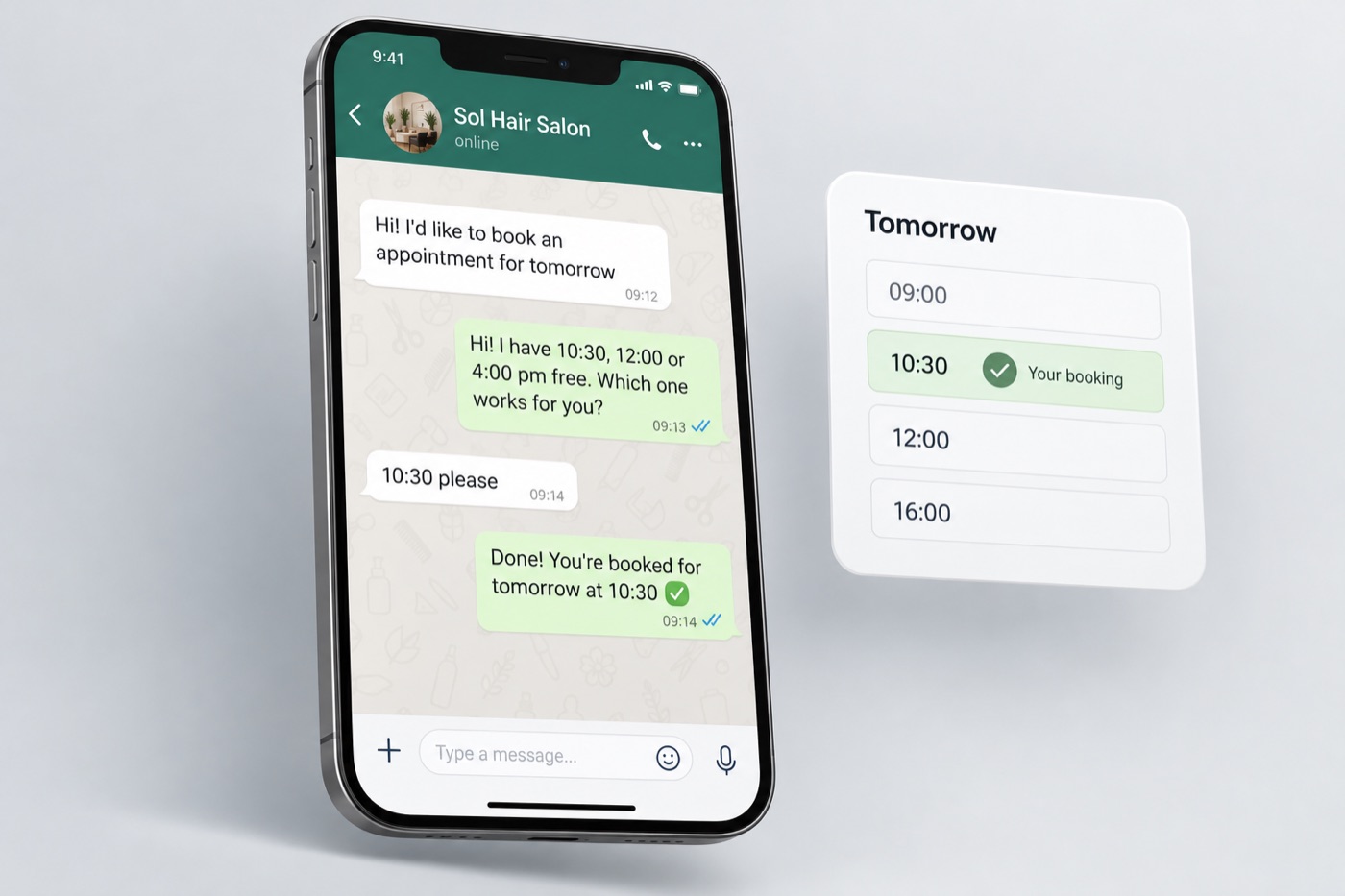
The appointment is saved in your calendar, and you see it as soon as it comes in. You do not have to keep an eye on your phone to avoid losing customers.
A sample request to get started: “I want a WhatsApp agent for my hair salon that answers hours, the price of each service and the address, takes appointments with day, time and service, and lets me know when someone wants to talk to me.” Then you adjust it by asking for changes in the chat.
The kinds of solutions out there
If you need replies to happen inside WhatsApp itself, the usual route is a chatbot platform connected to the official API. They differ a lot: some work with menus and buttons, some write replies with artificial intelligence, and some mix both. Instead of comparing promises, ask any provider these questions:
- Does it use the official WhatsApp Business API, or some other method?
- Whose name is the number under, and what happens to it if you ever leave the service?
- How does it hand a conversation to a person, and how will you know it is your turn to reply?
- Does its price include Meta’s charges, or are those billed on top?
- Can you review and correct its replies before they reach your customers?
What to prepare before any agent
Whatever route you choose, the groundwork is the same, and you can do it today with a pen and paper. An agent, an app or a page is only as good as the information you feed it.
- The questions people really ask Scroll back through recent chats and write down the questions that come up again and again, in your customers’ words, not yours.
- A short answer for each Write it the way you would say it out loud. If an answer needs a long paragraph, it may not be a job for an agent.
- Hours and exceptions Spell out when you are open, what happens on holidays and at what times of day a person can actually reply.
- When a person takes over List the cases that always come to you: complaints, last-minute changes, special prices or anything that is not on your list.
- What to ask for in a booking or an order Pick the bare minimum: day, time and service for an appointment; item, quantity and pickup time for an order. Fewer fields, fewer mistakes.
With that list in hand, every option gets easier to judge. You will see whether a provider covers your cases, or whether a page of answers plus a button to reach you is all you need.
What it does not do, plainly
Keep these limits in mind before you start:
- What you make does not show up under your business’s name where people download apps; your customers reach it through your link.
- It does not charge for orders or bookings: there are no card payments inside the app.
- It does not connect to your register, your accounting or the booking software you already run.
- The first version comes out simple; a fuller app takes several rounds of changes in the chat, and sometimes a request needs to be put another way.
- There is one bookings or orders list for everyone: whoever uses the app sees what you see, so do not collect private customer details there.
Frequently asked questions
Can Miniceo answer my customers inside WhatsApp?
Yes. You create your AI agent for WhatsApp: it answers common questions, takes bookings and orders, and passes to you whatever it cannot handle.
Can I use my usual number for an official agent?
On the official route, the business number has to be registered and verified with Meta. Which numbers qualify, and under what conditions, is explained on Meta’s official WhatsApp Business Platform pages.
How much does a WhatsApp agent cost?
It comes down to two things: what the platform you pick charges, and what Meta bills per conversation or per message under its current public pricing. Check both before you decide, because they change over time.
Can an agent replace a person?
For repeated questions, it can save you a lot of time. For complaints, exceptions or new situations, no. A good agent recognizes when it does not know and passes the conversation to someone on your team.
Where do I start if I have not picked an option yet?
With your list of common questions, hours and cases that always go to a person. That work pays off on any route, and it shows you whether you truly need an agent or a page of answers will do.